Bluebeam Max
AI-Powered Construction Review and Document Management
Supercharged Bluebeam Revu with Claude AI, Smart Review, and live BIM connectivity. Catch scope gaps before they reach the site. Available for £490 per user per year.
Introductory pricing locked through 2027 renewal | 14-day free trial | No credit card required
Introducing Bluebeam Max
Get Ready for a New Revu in an AI-first World
Bluebeam Max brings intelligence to your construction workflows. The new power-packed, AI-supercharged plan will combine the precision of Revu with AI. Talk to your drawings in natural language, automate repetitive tasks, accelerate drawing reviews, and bridge the gap between 2D and 3D documentation; all in one connected workspace.

Bluebeam Max
Everything You Need to Know About
Bluebeam Max is a premium, new plan that brings advanced AI-powered tools and features to your Revu and Studio. Talk to your drawings, accelerate drawing reviews, avoid rework, streamline workflows, and fill the gap between PDF and BIM with the most powerful Revu, Bluebeam Max.
Talk to Your Drawings
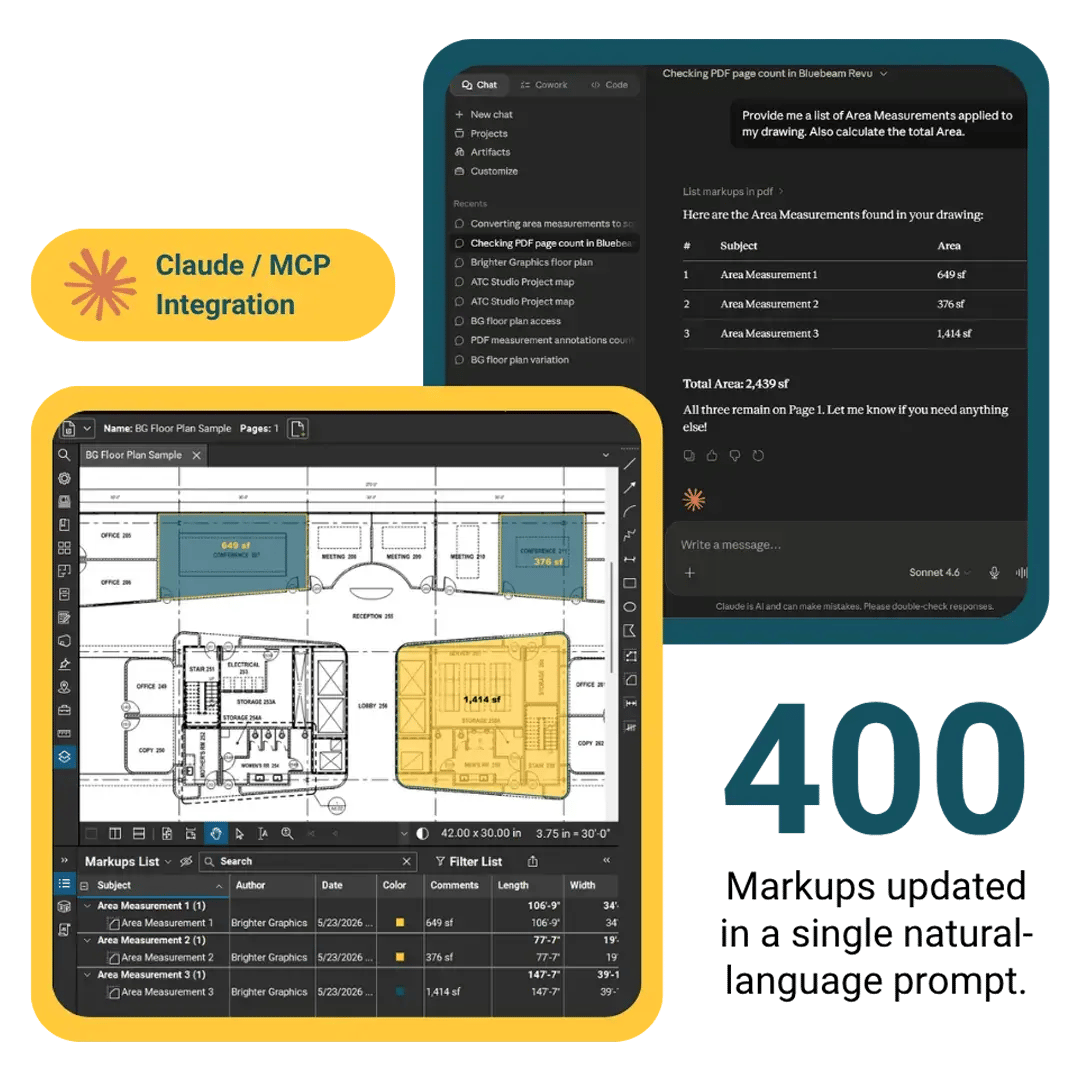
Use Claude AI to Interact with Your Drawings in Revu via MCP
Connect Bluebeam Max with Anthropic's Claude. Issue natural-language commands to scan PDFs, update 400 markups in a single prompt, review change orders, manipulate markups, fetch and edit PDF content, or query Markups List data. No need to navigate menus, spend time on mundane activities, and do repetitive tasks manually.
Smart Review
Use AI to Catch Scope Gaps Before They Become Trouble
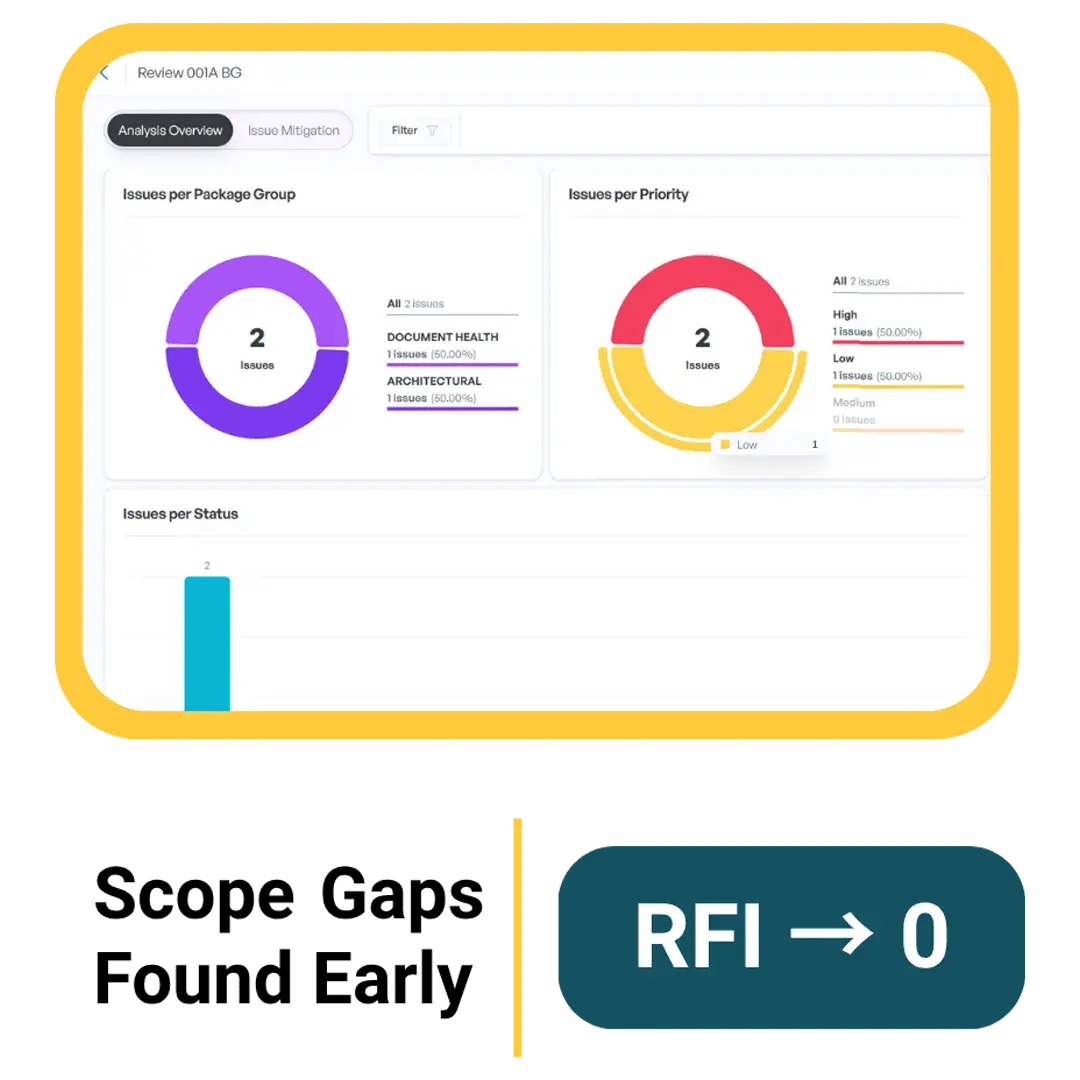
Leverage AI-powered Smart Review in Bluebeam Max to scan documents and find issues and conflicts in one go. Run Smart Review on a batch of construction documents to get insights, including AI-generated markups, trackable issues, and a detailed dashboard, surfacing design conflicts, scope gaps, and drawing discrepancies at a scale and consistency that manual review cannot match.
Smart Overlay
Detect Design Changes Across Every Discipline and Phase
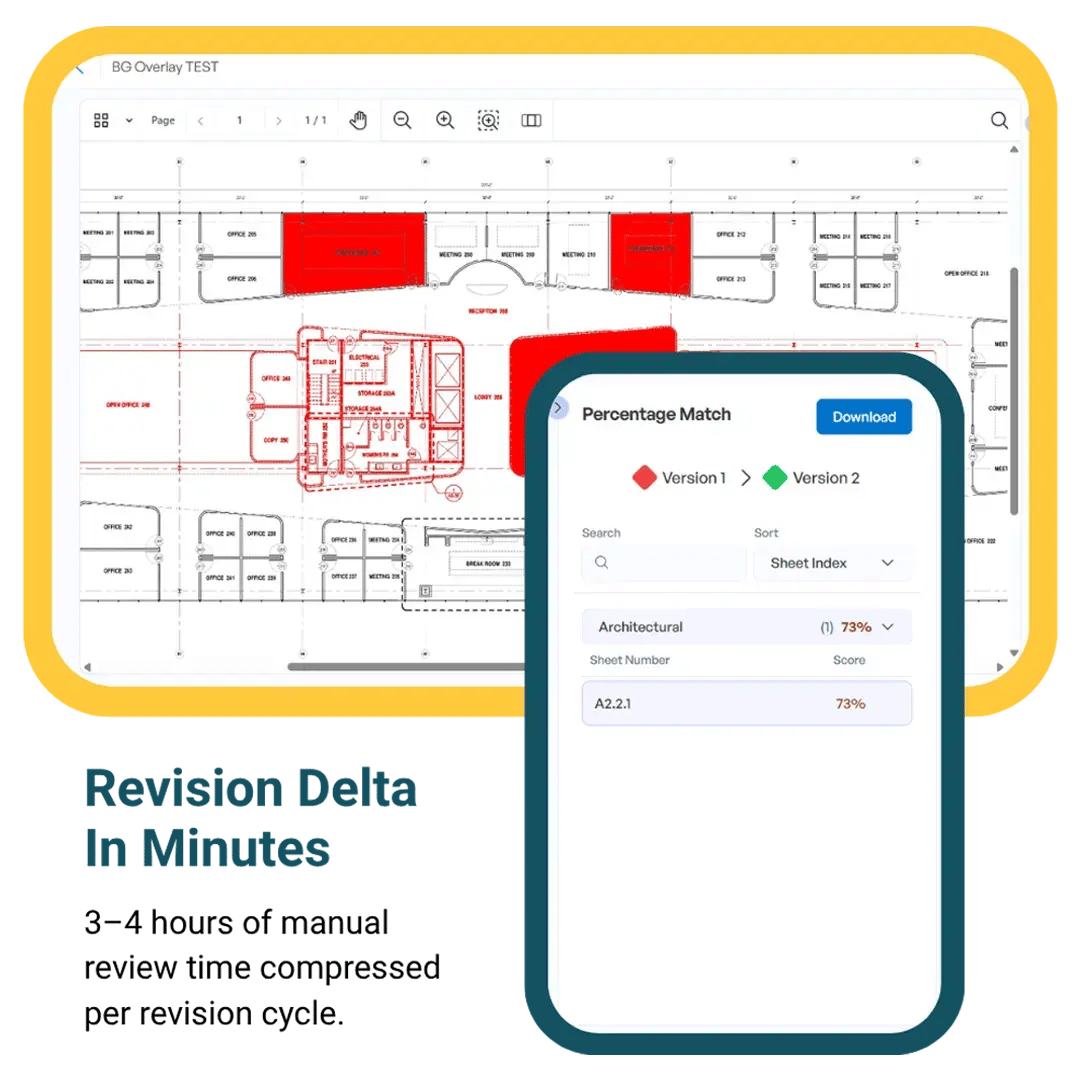
Use Smart Overlay in Max to automate the comparison of drawing revisions across phases, disciplines, and scales. Produce visual overlays showing exactly what changed, and generate exportable reports and trackable comparisons for the project record. No need for manual alignment, with this new multi-disciplinary, cross-scale functionality.
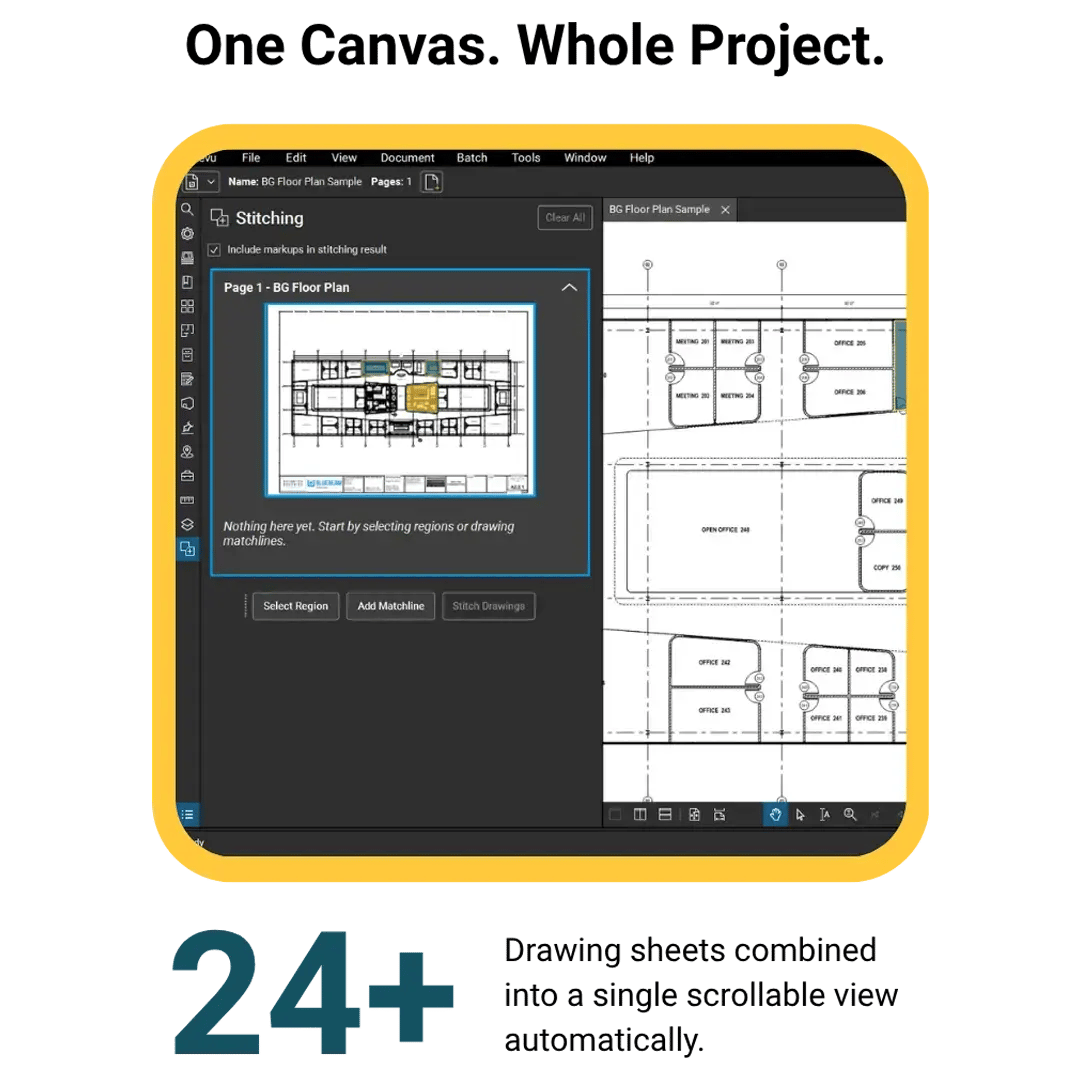
Stitching
One Continuous View Across Your Entire Project Drawing Set
Merge construction drawings using the new Stitching feature, which uses AI to automatically combine drawing sheets from different project sections into a single, continuous, scrollable canvas. A 1,000-metre corridor, a 100,000 sq ft floor plan across 20 sheets, a hospital campus, turn everything into a navigable space with one unified view. No manual alignment. No tab-switching.
Magic Markups
CAD-Level Precision Without Leaving Revu
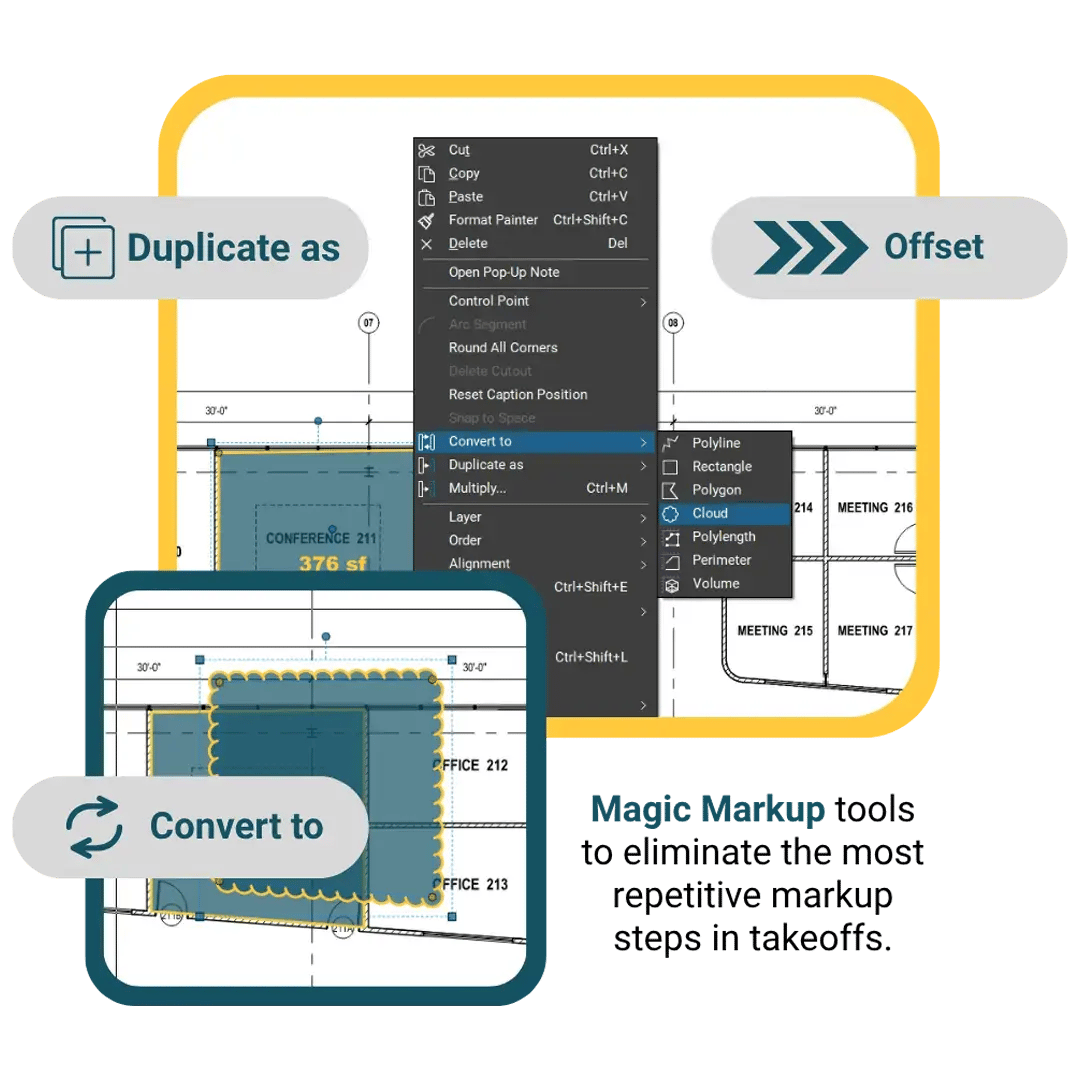
Get the most out of markups with Magic Markups, a trio of tools: Duplicate as, Convert to, and Offset. Eliminate repetitive redrawing steps in takeoffs and quantity surveys. Replicate a measured markup at a different material type. Change markup type without deleting and recreating. Create parallel lines at a precise distance. CAD-like workflow inside Revu.
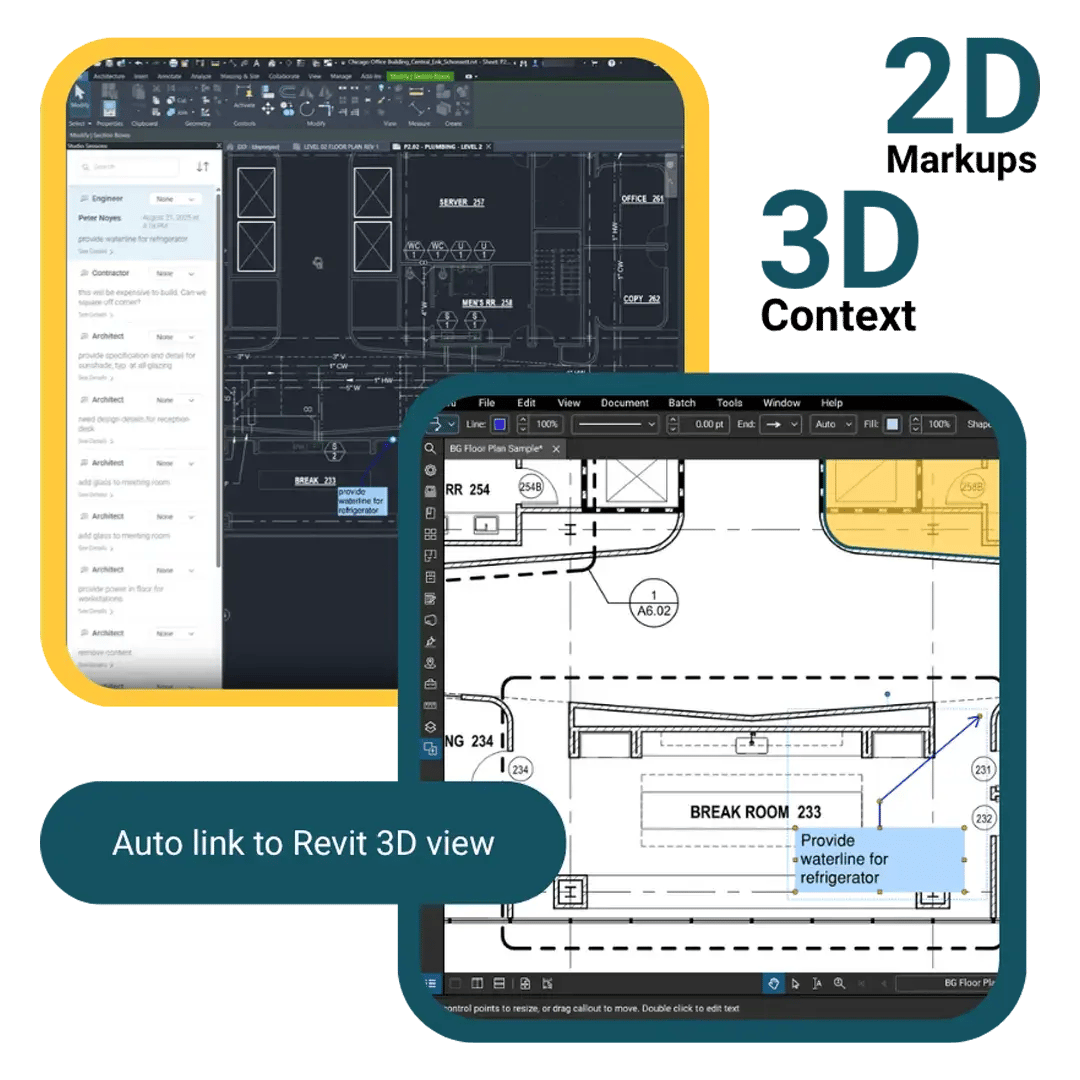
Connected Studio Sessions with Revit
Bridge the Gap Between 2D Drawings and 3D BIM
Connected Studio Sessions with Revit links markups added in Revu directly to their corresponding locations in the Revit model, synchronising 2D and 3D views. Enable your design teams to see every Bluebeam comment in their 3D space. Invite stakeholders to join from web, iOS, Android, or Revu; no extra licence required for collaborators.
Bluebeam Max vs. Complete
Which Plan Is Right for Your Team?
While Bluebeam Complete gives construction teams a comprehensive toolkit for markup, collaboration, and automation, Max is built for teams where the bottleneck is no longer software capability but review capacity. The £125/user/year difference buys an AI layer that actively participates in the review process.
intro price, locked 2027
Start Your Bluebeam Max Trial Today
14 Days Full Access
Full feature access
No credit card
Cancel anytime
UK-based support team
Introductory Pricing
locked through 2027 renewal for teams purchasing during the launch window
AI adoption in the AECO sector is gaining serious momentum. While 27% (3 out of 10) of firms have already embedded AI into their operations, the real signal lies in what comes next: 94% of those firms are actively planning to scale their AI use by 2027. The window to get ahead is now. Start your free trial today or continue with the paid plan at £490/user/year introductory pricing.
Evaluating
Try It Free
14 days of full Bluebeam Max access; try all new AI features, no card required.
Start Free TrialNeed Guidance
Talk to an Expert
Our expert team can advise on upgrade paths, multi-user licencing, and onboarding.
Book a CallReady to Buy
Buy Max Now
£490/user/year (est.) introductory price locked through your 2027 renewal.
Buy NowFrequently Asked Questions
-
What is Bluebeam Max, and how is it different from Bluebeam Complete?
Think of Bluebeam Max as the next step up from Complete: it's the premium AI-powered subscription tier for Bluebeam Revu, launched globally in May 2026 at £490/user/year, with that introductory price locked in through your 2027 renewal.
Bluebeam Complete, priced at £365 per user/year, already gives your team a solid foundation with markups, collaboration, batch processing, and automation. Max builds on all of that by adding six AI-exclusive features: Smart Review, Smart Overlay, Stitching, Magic Markups, Claude/MCP AI integration, and Connected Studio Sessions with Revit. If you buy Max, everything in Complete is included, so you're not giving anything up; you're gaining a lot more.
-
Will Bluebeam use my construction drawings to train its AI?
No, and that's an important distinction. Bluebeam's AI guiding principles are clear: any drawings you upload to Smart Review or Smart Overlay are never used to train AI models.
-
What types of drawing errors can Bluebeam Smart Review detect?
Smart Review is designed to catch the kinds of issues that can cause real problems on site if they slip through unnoticed. It runs three types of checks:
- Document health checks: flags blank sheets, missing sheets, non-unique sheet numbers, and missing referenced sheets
- Gridline coordination checks: Identifies inconsistent distances between structural and architectural gridlines
- Architectural checks: Picks up on door tags missing from schedules or plans, and flags missing door schedules altogether
The Smart Review feature is currently optimised for floor plans that follow US-standard architectural conventions, so it's best suited to US-based projects at this stage.
-
Does Bluebeam Max work with Autodesk Revit?
Yes. It's a genuinely useful and prominent integration offered in Bluebeam Max. Max includes Connected Studio Sessions with Revit, which creates a live, two-way link between markups in Revu and the corresponding location in your Revit model (including the correct sheet and 3D view).
Your wider team can join sessions from Bluebeam on web, iOS, Android, or Revu; no extra licence needed on their end. Anyone working on the modelling side, however, will need an Autodesk Revit licence.
-
Which AI models and platforms does Bluebeam Max support?
Bluebeam Max is built on the Model Context Protocol (MCP): an industry-standard framework for AI connectivity. Right now, it integrates with Anthropic Claude, which means you can use natural-language commands to process up to 400 markups in a single prompt.
As more platforms add desktop MCP support, Max will expand to include Microsoft Copilot, ChatGPT, Perplexity, and Gemini.
-
Do I need a Bluebeam Max subscription to use Claude with Revu?
Yes. The Claude integration features are available exclusively for Bluebeam Max users. So you need to switch to the Bluebeam Max subscription.
-
Do I need a paid Claude plan to use with Bluebeam Max?
You can use the free Claude version with Bluebeam Max, but for extensive use, it is recommended that you have a paid Claude plan. The free version of Claude can be used with Revu, but it only provides a small, limited Claude Tokens budget. You can use a paid Claude plan to maximise functionality and minimise interruptions. If you already have Bluebeam Max, we recommend using the free Claude plan and upgrading to the paid plan later (if needed).
-
What are tokens in Claude?
Tokens are the basic units Claude uses to read and generate text. A token is roughly 3 to 4 characters, or about 3/4th of a word. Everything in a conversation: your questions, Claude's replies, uploaded files, and chat history, is measured in tokens.
-
Is there a free trial for Bluebeam Max?
Yes, you can try Bluebeam Max free for 14 days with full access to all features, and no credit card is required to get started. Also, the Teams that purchase during the launch window can lock in the introductory price of £490/user/year through their 2027 renewal.
-
Is Bluebeam Max available to construction teams in the UK and Europe?
Yes, Bluebeam Max is available globally as of May 2026. Features including Smart Overlay, Stitching, Magic Markups, Claude/MCP integration, and Connected Studio Sessions with Revit are all available without any geographic restrictions.
The one thing worth noting for UK and European teams is that Smart Review is currently optimised for US-based vertical commercial construction. If you're keen to understand what's coming for UK-specific support, contact Brighter Graphics for the latest roadmap update.
-
How long does Bluebeam Smart Review take to process drawings?
Generally, results come through within a few minutes of starting a scan, though this can vary depending on file size and your system's bandwidth.
To kick off a scan, head to the Batch menu in Revu. Your results will then appear in Bluebeam on the web, and you'll receive a confirmation email once processing is complete, so you don't need to keep checking back manually.